JavaScript Concept 8 - Event Loop
JavaScript is a single threaded programming language
- single thread
- single call stack
- Its runtime can only process one piece of code at a time
Any code that is slow blocks the stack.
For example console.log isn’t slow, but doing a while loop from one to ten billion is slow, doing image processing is slow, and network request is slow.
what happens when things are slow?
The browser gets stucked. While the request is handled, the browser can’t render thereby users can’t do anything until those requests complete.
The solution? Asynchronous callbacks
console.log('hello')

// this part goes to WebAPIs
setTimeout(function() {  console.log('there')}, 3000)
console.log('how are you?')

// hello
// how are you?
// there
But how is this possible if JavaScript runtime is single threaded? Because browser is more than just the Runtime. It provides us with WebAPIs, which we can make calls to. So it’s working as multi threads in the back. This diagram is basically identical for node, except the fact that it’s using C++ APIs instead of WebAPIs.
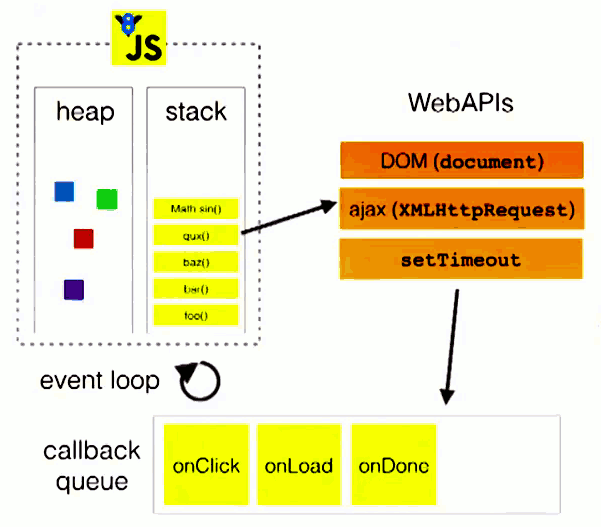
Event loop’s job
Event loop looks at the stack and the task queue. If the stack is empty, it takes the first thing on the queue and pushes it on to the stack.
The order of proccessing asynchronous callback
- Pass the callback to webAPIs and pop off the callback from stack
- WebAPIs pushes the callback on to the task queue when it’s done
- Event loop checks if the call stack is empty
- If the call stack is cleared, event loop pushes the callback from the task queue to the call stack
setTimeout is a minimum time to execution
setTimeout is not guaranteed time to execution, it’s a minimum time to execution.
console.log('hello1')

// setTimeout zero doesn't run immediately
setTimeout(function() {
  console.log('hello2')
}, 0)

console.log('hello3')

// hello1
// hello3
// hello2
Conclusion : Don’t put slow code on the stack because when you do that, the browser can’t do what it needs to do, creating a nice fluid UI.
Reference
https://www.youtube.com/watch?v=8aGhZQkoFbQ&t=821s

